


Cats are Liquid - ABP
4.63.55K Reviews
App Specs
- Version
- 1.3.8
- Updated On
- License
- Free
- Downloads
- 5,000,000+
- Developer
- Last Quarter Studios Ltd
- Categories
- Adventure
- Platform
- Android
Screenshots
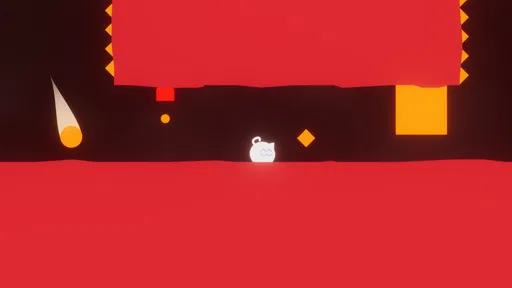
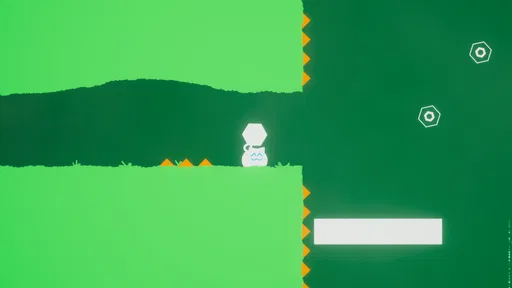



 Analysis by AppCompare
I went into Cats are Liquid - ABP expecting a small, playful platform game, and that is exactly where it works best. It is an adventure game built around a liquid cat and her friends, but the appeal is not just the unusual character design. The experience depends on learning how to read a compact 2D level, judge movement carefully, and recover when a seemingly simple jump goes wrong. I found it easy to start and surprisingly easy to underestimate.
The game is free, developed by Last Quarter Studios Ltd, and aimed at players aged Everyone 10+. It has reached over five million installs, with a 4.6 average from around forty-eight thousand ratings. Those figures suggest a broad audience, but they do not tell you whether its particular style will suit you. My impression is that it is a better fit for someone who enjoys short, focused platforming challenges than for someone looking for a large adventure with extensive exploration.
What makes the liquid-cat format work
The central idea gives the game its identity immediately. You guide a cat whose liquid nature changes how movement feels, while the surrounding adventure keeps the presentation light and approachable. I liked that the concept is clear without requiring a long explanation. You can understand the basic fantasy almost at once, then spend your attention on timing and navigation rather than learning a complicated rule set.
That simplicity is also where the game can catch new players. The character looks soft and harmless, so it is tempting to treat each screen casually. In practice, careful observation matters. A platform that seems reachable may require better positioning than expected, and a route that looks obvious may not be the safest one. I had more success when I stopped rushing and treated each short section as a small puzzle about movement.
The 2D format helps the game feel readable on a phone. The action stays contained, and the important question is usually visible in front of you: where to go, when to move, and how to avoid losing control. Compared with many mobile adventure games that fill the screen with menus, upgrades, and competing objectives, this one feels deliberately narrow. That focus is a strength when I want a quick game that still asks me to pay attention.
It is not the right choice if your favorite adventure games are built around dialogue, collecting a large inventory, or wandering through a huge map. The liquid-cat premise is the star, but the game is fundamentally about platforming. Anyone expecting a story-heavy journey may find the experience too concentrated on movement.
The first moments are simple, but the control relationship matters
My first useful adjustment was to learn the rhythm of the controls instead of trying to force progress immediately. On a touchscreen, even a small thumb movement can feel more significant than it would on a physical controller. I recommend beginning with a few deliberate attempts, watching how the character responds, and using that knowledge before attempting a difficult-looking passage.
Worth Reading Before You Choose

EA SPORTS FC Mobile 26 Is a Bigger Football Game, but It Takes Time

Flipboard Shows What News Apps Must Do Beyond the Feed

Switching to Android Auto Means Rethinking Your Driving Routine

Google Calendar Makes a Crowded Week Easier to Manage

Ludo King Makes the Most of the Minutes Between Plans

Baby Panda World Brings Quick Play to Modern Phones, but Its Game Library Feels Busy
This is especially important for younger players. The age guidance makes the game accessible to a family audience, but accessible does not mean every section will be effortless. A child who enjoys colorful characters may still need time to understand why a jump failed. Playing together for the first few minutes can help, particularly if the player tends to repeat the same rushed approach.
I also found that the game rewards a calm screen-by-screen habit. Instead of holding a direction for too long, I used brief inputs and checked the result before committing to the next action. That approach is less exciting than rushing, but it reduces avoidable mistakes. It is one of those small changes that makes the game feel more predictable without removing the challenge.
Where players are most likely to get stuck
The most common frustration is not understanding the character’s movement well enough before entering a tighter section. If you repeatedly fail at the same point, the problem may be your timing rather than the route itself. I would replay the approach slowly, identify the exact moment control is lost, and then change only one part of the attempt. Changing everything at once makes it difficult to learn what actually helped.
Another likely sticking point is assuming that the most direct path is automatically the intended path. In a compact platforming game, the visible route can invite a quick decision, while a safer approach may require waiting or repositioning. When I slowed down, I noticed that many failures came from acting as soon as a platform appeared rather than checking the whole movement sequence.
Touchscreen handling can add another layer of friction. Fingers cover part of the display, and a player may accidentally release or press at the wrong time. I found it useful to keep my hands relaxed and avoid changing grip during a difficult sequence. If the controls suddenly feel inconsistent, I would first check whether my thumb position has shifted before assuming the game itself is malfunctioning.
There is also a psychological trap: the character’s playful appearance makes failure feel like it should be avoidable. That can lead to impatient retries. I got better results by treating each failed attempt as a short test. Was I too early, too late, too far to one side, or simply moving before I had a clear plan? That mindset fits this game much better than repeated guessing.
Setup checks before blaming the game
The game supports devices running Android 7.1 or later, so compatibility is the first practical check on Android. If the installation does not proceed, I would confirm the operating system version and available storage, then retry through the normal app store process. Those are basic checks, but they prevent a player from spending time troubleshooting gameplay when the issue is device readiness.
Because the game is free, the decision to try it is relatively low-risk. Still, I would install it from the official store on the device rather than relying on an unfamiliar copy. That makes it easier to receive the current release, which is version 1.3.8, and gives you a cleaner starting point if something later goes wrong.
After installation, I recommend opening the game with other demanding apps closed. This is not because the game is unusually complicated, but because background activity can make any touchscreen game feel less responsive. A fresh launch also gives you a better chance to judge the controls fairly. If the first session feels sluggish, restart once before deciding that the game is unsuitable.
It is worth checking the device’s touch response as well. If taps or swipes feel delayed in other apps, the same issue may appear here. A screen protector, damp fingers, or a crowded multitasking session can affect control precision. These are small details, yet platforming exposes them quickly because a fraction of a second can change the result.
On iOS, I would apply the same general principle: keep the system updated within the device’s supported range, close unnecessary apps, and restart if the initial launch behaves oddly. I would not change several settings at once. A simple sequence—close, relaunch, restart, then test again—makes it easier to identify whether the problem is temporary.
Recovering a session after a failed attempt
When a run goes badly, my preferred recovery method is to pause mentally before restarting. I look at the last successful action rather than the entire level. If the failure happened after a particular landing, I repeat that landing with a smaller movement and then continue. This turns recovery into a manageable workflow instead of an emotional reset.
If the game appears frozen, I would wait briefly, then close and reopen it once. If that does not help, restarting the device is the next sensible general step. I would avoid repeatedly tapping the screen or rapidly switching between apps, since that can make it harder to tell whether the game has recovered. A clean relaunch is more useful than frantic input.
Players should also distinguish between losing progress through ordinary gameplay and losing progress because of a technical problem. A missed jump is part of the challenge; a crash, unresponsive screen, or failure to launch is different. Keeping those situations separate helps set realistic expectations. The correct response to a missed jump is practice, while the correct response to a launch problem is a basic device and installation check.
For a child using the game, a short break can be surprisingly effective. If frustration is causing rushed inputs, another immediate attempt may simply repeat the same mistake. I would suggest stepping away for a few minutes, then returning with one specific goal, such as improving the opening movement or reaching the next safe position. That makes the game feel fairer and keeps the challenge from becoming a chore.
When the game is not the cause
Not every bad experience comes from the game. If touch controls are inaccurate across several apps, the phone or tablet is the more likely source. If only this game behaves strangely after a long session, a restart is a reasonable first test. If performance changes when many apps are open, background activity may be contributing. These simple comparisons are more useful than assuming the latest problem must be caused by the game.
Network conditions can also confuse troubleshooting, even when the actual play experience feels mostly self-contained. If the store page, installation process, or update check behaves unexpectedly, I would test the connection separately and try again later. I would not keep reinstalling immediately, because that can create extra uncertainty without addressing a temporary connection issue.
Storage is another practical consideration. A device that is nearly full may install or update unreliably, and it may also behave poorly in unrelated ways. Clearing a little space and restarting can be a sensible general remedy. I would make sure important personal files are backed up before removing anything, especially on a shared family device.
Finally, expectations can create a false technical complaint. The game’s movement may feel unusual because the liquid-cat concept changes how the character behaves. If the response is consistent but different from a conventional platformer, that is a design characteristic rather than an error. I would spend time learning the movement before concluding that the controls are broken.
How it compares with ordinary mobile platformers
Compared with a conventional 2D platformer featuring a solid character, this game has a more distinctive learning curve. The visual premise is memorable, and the liquid-cat identity gives the adventure a personality that a generic jump-and-run game may lack. In exchange, players who want instantly familiar movement may need more adjustment before the controls feel natural.
It also differs from larger mobile adventure games that emphasize exploration, character upgrades, or long sessions. Here, I would choose it for a focused break rather than a long evening of progression. That makes it useful on a commute, during a waiting period, or whenever I want a game that can be approached in small efforts without first remembering a complicated story or inventory.
Against endless runners, the experience feels more deliberate. Endless runners are often about reacting continuously while the route keeps moving. This game gives me more reason to study a section and improve a specific attempt. If I want a quick reflex loop with little planning, another genre may be better. If I want to understand why a platforming mistake happened, the liquid-cat format offers more satisfying feedback.
It is also less suitable than a controller-focused platformer for players who demand precise physical buttons. A touchscreen can work well here, but it remains dependent on the device, grip, and finger placement. I would recommend trying the opening section before committing to long sessions. If the controls never become comfortable, the game’s charm may not compensate for that basic mismatch.
Who should play it, and who should skip it
I would recommend it to players who enjoy charming visual ideas, compact 2D challenges, and learning through repeated attempts. It is especially appealing if you like games that can be understood quickly but still reward patience. Families may appreciate the approachable presentation, while experienced platformer fans may enjoy seeing how the liquid-cat concept changes familiar movement expectations.
I would be more cautious about recommending it to someone who dislikes repetition. Progress depends on trying again after mistakes, and the game’s appeal is tied to gradually improving control. It is also a weak match for players seeking deep role-playing systems, competitive multiplayer, or a large narrative campaign. Those expectations point toward a different kind of adventure.
The free price makes experimentation easy, and the broad install base shows that the concept has found a substantial audience. Even so, popularity does not remove the need for a personal control check. I would give it a fair trial on the device you plan to use, preferably when you can play without distractions. A game based on timing is judged poorly when the player is hurried or the screen is difficult to handle.
My practical verdict
After spending time with it, I see Cats are Liquid - ABP as a focused mobile adventure with a genuinely specific identity. The liquid cat is more than a decorative character; it shapes the way I approach movement and gives the platforming a different feel from standard phone games. The best sessions came when I played patiently, made small control adjustments, and treated failed attempts as information.
The main friction is equally specific. Touchscreen precision, unfamiliar movement, and impatience can combine to make early progress feel harder than the friendly presentation suggests. Basic setup checks—supported operating system, available space, a clean launch, and a responsive screen—remove some avoidable trouble. After that, improvement depends mostly on learning the game’s movement rather than searching for a hidden fix.
For me, the strongest use case is a short, attentive play session when I want something more thoughtful than an endless runner but less demanding than a large adventure game. I would install it for a younger player who enjoys platforming, while staying nearby during the first session to help with timing and frustration. I would skip it for anyone who wants a story-led epic or physical-controller accuracy above all else.
Overall, this is a free game worth trying because it offers a clear idea and follows through on it without burying the experience under unnecessary complexity. Its 4.6 average and millions of installs are consistent with my impression that it connects with many players, but its real test is personal: can you enjoy repeating a section until the liquid cat finally moves exactly as intended? If the answer is yes, this small adventure has enough character and control depth to earn a place on your phone.
Pros
- Creative platforming built around fluid movement and transformation.
- Hand-drawn visuals give the game a distinctive
- charming personality.
- Short levels make it easy to play during quick breaks.
- Exploration rewards patience with hidden paths and collectibles.
- Atmospheric sound design complements the calm
- surreal presentation.
Cons
- Some controls can feel imprecise during fast or narrow platforming sections.
- Later puzzles may become frustrating without clear visual guidance.
- The minimalist style can make interactive objects hard to notice.
- Progress may feel repetitive if you prefer action-packed platformers.
- Ads or in-app interruptions may affect the experience on mobile.
FAQs for Cats are Liquid - ABP
What is Cats are Liquid - ABP?
Cats are Liquid - ABP is a 2D platform adventure game focused on exploration, movement, and atmosphere. You control a flexible cat that can transform into liquid, allowing it to squeeze through narrow spaces and reach areas that ordinary characters could not access. The game combines platforming challenges with an unusual visual style, environmental puzzles, and a story that unfolds gradually as you progress.
How does the liquid transformation work in the game?
The liquid ability is the central mechanic of Cats are Liquid - ABP. Depending on the situation, your cat can change form to pass through small gaps, avoid obstacles, and solve level-based challenges. This transformation is not simply a visual effect; it directly affects how you navigate each stage. Players need to experiment with movement, timing, and positioning to use the ability effectively.
Is Cats are Liquid - ABP suitable for casual players?
Yes, the game can be enjoyed by casual players, especially those who like short platforming experiences with creative mechanics. The basic controls are easy to understand, but some sections require patience, accurate movement, and repeated attempts. It is not an action game built around constant combat, so the experience generally feels more focused on exploration, puzzle solving, and learning how each environment works.
Does Cats are Liquid - ABP require an internet connection?
Cats are Liquid - ABP is primarily designed as a single-player experience, so its main gameplay does not depend on online multiplayer or constant interaction with other players. However, connection requirements can vary depending on the version, device, store installation process, advertisements, or optional services. It is recommended to install the game from an official source and check its current store information before downloading.
Are there ads or in-app purchases in Cats are Liquid - ABP?
The availability of advertisements, paid content, or in-app purchases may depend on the platform and the specific version of Cats are Liquid - ABP you download. Before installing, review the official Google Play or App Store listing for the latest monetization details. Players should also check the permissions, age rating, and developer information to make sure the version matches their expectations and device requirements.


